
A Short History of Excel: Forty Years in Rows and Columns
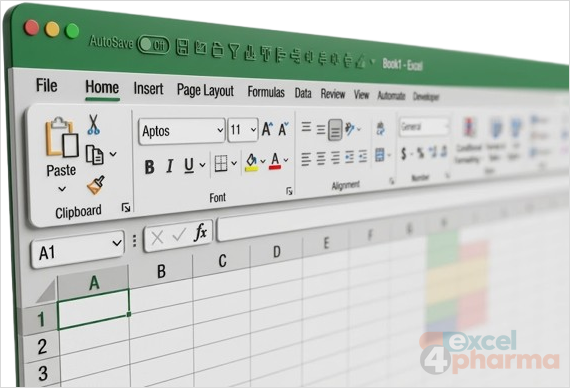
Excel and health care are connected in more ways than one might expect, as we will see along the way. Two of the three stories at the end of this article come straight from health care: a set of human genes renamed because of a spreadsheet setting, and thousands of COVID-19 test results lost in England because of an old file format. Choosing the right Excel version, and the right file format, can look like a technicality. Sometimes it can save lives.
This article is a brief history of Excel: how it was born, how it changed from 1982 to today, and a few curiosities collected along the way.
But what is Excel? If you landed here you are a user already, yet it is still worth saying what sets a spreadsheet apart from a calculator. A calculator gives a result and forgets how it got there. A spreadsheet keeps the whole chain: some cells hold values that we can change, others hold formulas that depend on them, and when one value changes, every result that depends on it changes too. That is all a model is, from a price list to a ten-year forecast.
What changed over forty years is everything around that idea: the screen, the menus, the size of the grid, the way we buy the program. Several of Excel's quirks, from the way it stores dates to the number of rows in an old file, only make sense once we know the decisions that produced them. That is why the article closes with three documented episodes in which those decisions had real consequences.
Before Excel: Multiplan and Lotus
Microsoft's first spreadsheet was not Excel but Multiplan, launched in 1982. It ran on many machines of the time, from the Apple II to CP/M and MS-DOS computers, and it looked like everything else on those screens: light characters on a dark background, no mouse, rows and columns both numbered, and cells addressed as R10C3 rather than C10. Commands sat in a line at the bottom of the screen and were chosen by typing their first letter.
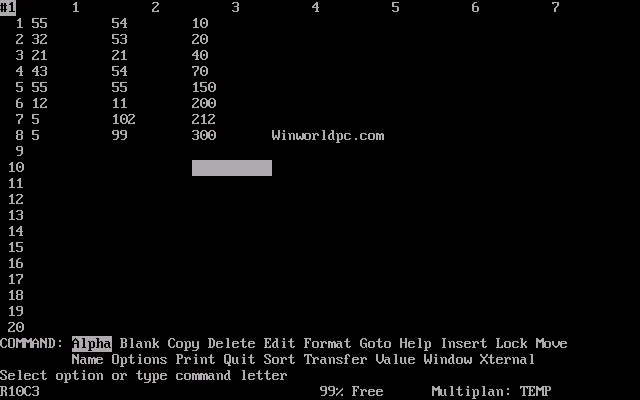
Multiplan did well on CP/M, but on the IBM PC it was overtaken by Lotus 1-2-3, which by 1983 had become the market standard, ahead of both Multiplan and the pioneering VisiCalc. The R1C1 style did not disappear: Excel still offers it under File > Options > Formulas.
Born on the Mac
Microsoft's answer was a new project, codenamed Odyssey, started in 1983. It was first meant for IBM-compatible PCs, but in March '84 Bill Gates moved it to the Apple Macintosh, where Lotus was not yet dominant. The switch cost months of work, since the program now had to run in the Mac's 512 KB of memory.
On 2 May '85 Steve Jobs and Bill Gates announced Excel together at a press event in New York, and the program went on sale for the Macintosh in September '85. It brought three ideas that we now take for granted. The user could choose fonts and the look of each cell, something character-based spreadsheets could not do. Recalculation was selective: only the cells that depend on a changed value were recomputed, instead of the whole sheet. And charts were built in from the start.
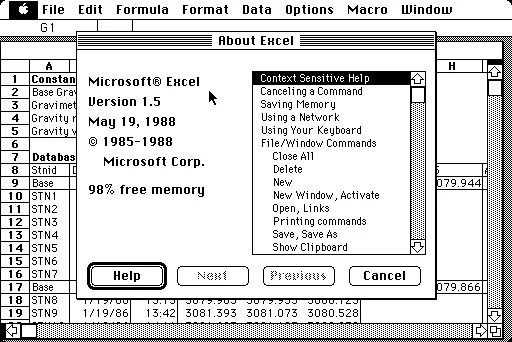
The first Windows version followed in November '87. It was numbered 2.0 to match the Mac release, and Windows was so little used at the time that Excel shipped with a runtime version of Windows included. There was never a DOS version of Excel. Lotus was slow to move 1-2-3 to Windows, and by the early 1990s Excel was outselling it.
The menu years
From 1990 to 2003 Excel looked, broadly, like this: a menu bar at the top, one or more toolbars under it, and the grid. Each release added something we still use every day.
Excel 3.0, in 1990, introduced the toolbar, with the AutoSum button and tools to draw lines and shapes on the sheet. Excel 4.0, in 1992, brought AutoFill, the small handle that extends a series when you drag it, and placed charts directly on the worksheet beside their data. Excel 5.0, in 1993, allowed several sheets in one workbook, with tabs at the bottom of the window, and introduced Visual Basic for Applications (VBA) with the Macro Recorder. Excel was the first Microsoft program to ship with VBA.

The menu bar of that period, File, Edit, View, Insert, Format, Tools, Data, Window, Help, stayed almost unchanged for fourteen years, and a generation of analysts learned to find commands by their place in it. Freeze Panes, for example, lived in the Window menu. Today it sits on the View tab, which is where most people would look for it first.
Excel 95 and 97: thirty-two bits and a paper clip
Excel 95 was the first 32-bit version, built for Windows 95. It was numbered 7.0 rather than 6.0, so that every program in the Office suite could share the same version number: Word had already reached 6.0.
Excel 97 raised the grid from 16,384 rows to 65,536, a number that comes back at the end of this article, and introduced the Office Assistant, the animated paper clip that offered help whether or not it was wanted. It was switched off by default a few years later and removed from Office in 2007.
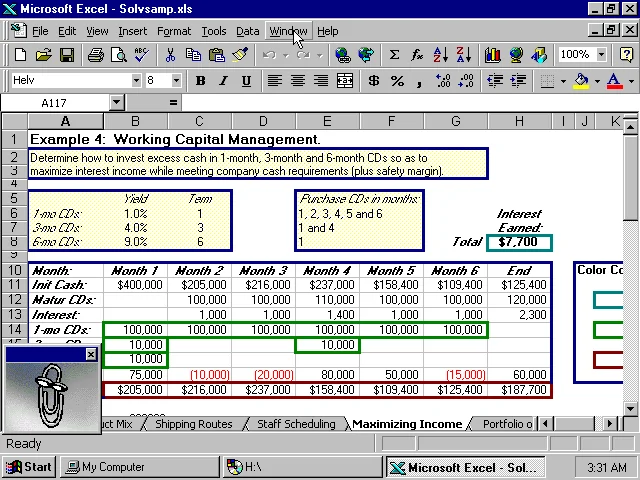
These were also the years of the Easter eggs, small games that the developers hid inside the program. Excel 4.0 had an animation in which the numbers 1, 2 and 3, a nod to Lotus 1-2-3, were crushed by the Excel logo. Excel 95 contained a three-dimensional maze called the Hall of Tortured Souls, lined with the developers' names. Excel 97 hid a flight simulator, and Excel 2000 a driving game called Dev Hunter. From Excel 2002 onwards Microsoft removed undocumented features of this kind, so none of them survives in current releases.
Not all the fun was official. Users have since built Tetris, Pac-Man and Monopoly in ordinary worksheets, and since 2020 competitive financial modelling in Excel has even been broadcast as an esport.
The Ribbon and the big grid
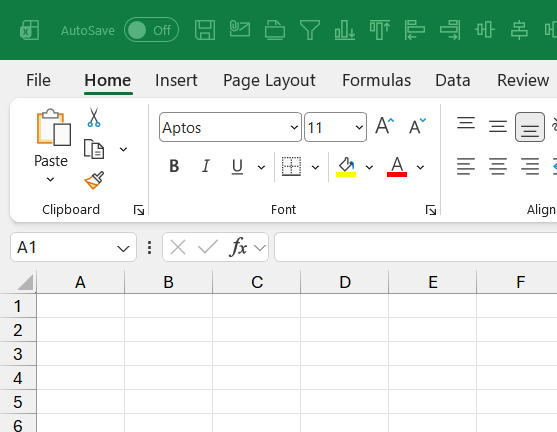
Excel 2007 was the largest change since the move to Windows. The menus and toolbars were replaced by the Ribbon: tabs grouped by task, with the commands used most shown largest. Some tabs appear only when they are needed, for example the chart tabs when a chart is selected. The default font moved from Arial 10 to Calibri 11, and files gained a new format, .xlsx, based on compressed XML. Files that contain macros end in .xlsm, and the binary .xlsb format, often the most compact, can hold macros too. Tables, the structured ranges that grow with their data, arrived in the same release.

Behind the new interface, the limits changed even more. The table compares Excel 2003 with the current version.
| Limit | Excel 2003 | Microsoft 365 |
|---|---|---|
| Rows per sheet | 65,536 | 1,048,576 |
| Columns per sheet | 256 (IV) | 16,384 (XFD) |
| Characters in a formula | 1,024 | 8,192 |
| Nested levels of functions | 7 | 64 |
| Arguments in a function | 30 | 255 |
| Levels in a single sort | 3 | 64 |
| Items in a filter list | 1,000 | 10,000 |
| Undo levels | 16 | 100 |
| Colors in a workbook | 56 | 16 million |
The jump in rows and columns means the grid now holds more than 17 billion cells. Many files in the older .xls format still carry the old limits, a detail that matters in the third story below.

The releases that followed refined the idea rather than replacing it. Excel 2010 brought back the File menu in place of the round Office button that few people liked, and added sparklines, slicers and Power Pivot, an add-in that handles millions of rows outside the grid. Excel 2013 adopted a flat look and added Flash Fill, which completes a column by guessing the pattern from a few examples, and Quick Analysis. Excel 2016 built Power Query into the Data tab, added the Forecast Sheet and new charts such as the waterfall. One of us has never forgiven the 2007 chart engine for making 3D charts so easy to produce: an opinion, but a firmly held one.
Excel as a service
Since 2016 subscribers to Microsoft 365 no longer wait for a new version: features arrive continuously, which is why this site refers to "Microsoft 365 for Windows" rather than to a version number. The buying model changed too, from a license bought once to a subscription.
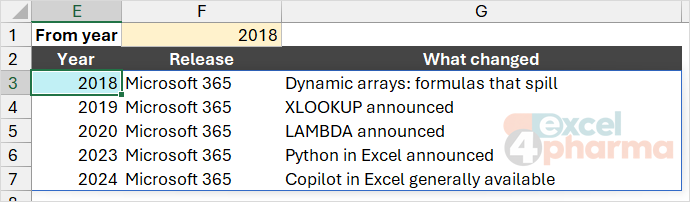
Some of the most important changes of the last decade happened inside the formula language. Dynamic arrays, announced in 2018 and available to all subscribers by 2020, let one formula return many values that spill into the cells below. XLOOKUP, announced in 2019, finally offered a lookup without the traps of VLOOKUP. LAMBDA, announced in December '20, lets users write their own functions with formulas alone, and made Excel's formula language Turing complete: in principle, it can compute anything a programming language can. Python in Excel was announced in 2023, and Copilot in Excel became generally available in 2024.
Three documented stories
A day that never existed
The year 1900 was not a leap year: century years are leap years only when divisible by 400. Excel nonetheless accepts 29 February 1900 as a valid date. Typing =DATE(1900,2,29) returns a date, not an error.
Microsoft explains the reason in its own documentation. Lotus 1-2-3 treated 1900 as a leap year, and Multiplan and Excel adopted the same assumption so that they could use the same date serial numbers as Lotus and exchange worksheets with it. Correcting the error today would shift almost every date stored in existing workbooks by one day and break compatibility with other programs, so Microsoft has chosen to keep it. Only dates before 1 March 1900 are affected, and all other leap years, including 2100, are handled correctly.
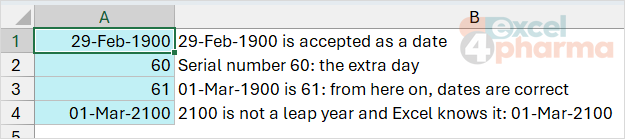
The lesson goes beyond the calendar. Every date in Excel is a number counted from 1 January 1900, and decisions taken in the 1980s still shape how that number behaves.
The genes that were renamed
Excel converts text that looks like a date into a date, as soon as it is typed or pasted. For most users this is a convenience. For geneticists it was a problem: gene symbols such as MARCH1 and SEPT1 were silently turned into 1-Mar and 1-Sep, and the original text could not be recovered from the converted value.

The issue was first reported in the scientific literature in 2004. In 2016 a study of the supplementary spreadsheets attached to 3,597 genetics papers found gene name errors in 19.6% of them, in journals as prestigious as Nature. In August '20 the HUGO Gene Nomenclature Committee, which assigns official symbols to human genes, published new guidelines and confirmed that 27 genes had been renamed: MARCH1 became MARCHF1 and SEPT1 became SEPTIN1. Science changed its vocabulary to work around a spreadsheet setting.
The story has a second ending. In October '23 Microsoft added an option that lets users switch automatic data conversion off, under File > Options > Data > Automatic Data Conversion. The companion file has a Gene Symbols sheet to try it.
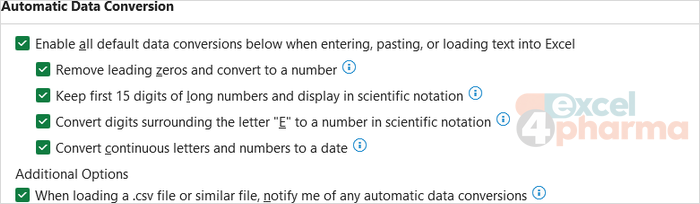
The broader lesson stays: Excel interprets what we type, and it is our job to check that it interpreted it correctly.
The cases that fell off the sheet
Between 25 September and 2 October '20, during the COVID-19 pandemic, 15,841 positive test results in England were left out of the daily figures reported by Public Health England. The people concerned were passed to contact tracers late, so their contacts were traced late too, at a time when cases were rising fast.
The BBC reconstructed the cause. Commercial laboratories sent their results as CSV files, and Public Health England's own developers had built a process that loaded them into Excel templates saved in the old .xls format. An .xls file stops at 65,536 rows, the limit set by Excel 97. Each test result took several rows, so a template could hold only about 1,400 cases; anything beyond the limit was simply not imported, and no error stopped the process. The modern .xlsx format would have held sixteen times as many. As a quick fix the data were split into smaller batches, and the missing cases were added to the totals once the problem was found.

Jon Crowcroft, a professor at the University of Cambridge, summed it up for the BBC: Excel "was always meant for people mucking around with a bunch of data for their small company to see what it looked like". Excel itself did exactly what its specification said, and when a person saves a large workbook in the old format, Excel warns them.
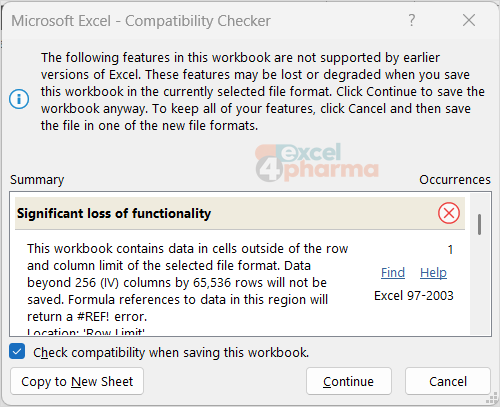
The failure was in choosing an outdated format, and in a process that never checked whether every record that went in also came out. Pharma runs on the same kind of pipeline: sales extracts, claims files, patient-level data and market research arrive as CSV files and are loaded into workbooks every week. Counting the rows before and after an import takes two minutes, and it is the control that would have caught this error on the first day.
What the three stories have in common
None of these episodes was a calculation error in the usual sense. In each case Excel behaved exactly as designed, and the damage came from a design choice the user did not know about: a calendar assumption, an automatic conversion, a size limit. That is the best argument for learning how the tool works rather than only what to click, and it is the thread that runs through every article on this site.
Companion files
Illustrative data only. Not a decision tool.For further reading
- Excel specifications and limits - Microsoft Support
- Excel incorrectly assumes that the year 1900 is a leap year - Microsoft Learn
- History of Microsoft Excel - versionmuseum.com
- Excel: Why using Microsoft's tool caused Covid-19 results to be lost - bbc.com