
Six Types of Excel Model
The problem
A workbook that tries to answer every question usually answers none of them well. The sheet that holds three years of raw sales, the sheet that tests a price change and the sheet the manager reads on Monday morning have different jobs, different users and different ways of going wrong. Deciding which job a workbook has comes before the first formula.
Excel models can be sorted in two ways. By objective there are three: the database, the simulation and the report. By approach, when the goal is a forecast, there are three more: the parametric model, the model built on historical data and the hybrid. They are not rival schools. A good workbook often contains several of them, each on its own sheets and each doing one thing.
The examples use the companion file W01_Model_Types.xlsx. The Model types sheet summarizes the six types in one table. The Database sheet holds 48 illustrative rows of monthly units and net sales for two products, and the Parametric, Historical, Hybrid and Report sheets build one example of each of the other types on top of it.
Three types by objective
The database
Excel is not a relational database, but it can collect structured data well enough to feed everything else. A database workbook follows four rules. All the raw data sit in one place, in a single table. Data and calculations are kept apart, so that a calculation never overwrites a record. Key variables are entered once and linked by formulas, never retyped. And the cells that people may change are the only unlocked ones.
On the Database sheet each column carries one kind of information: month, product, units, net sales and year. The data is an Excel table, which means new records join the structure when they are typed under the last row, as described in the article on structured tables. Totals by product or by year come from SUMIFS or from a PivotTable, without rewriting a single record. A database answers no question by itself. Its value is that every other model reads from it.
The simulation
Simulation is the core of planning in Excel. A simulation model forecasts trends, compares alternative scenarios ("what happens if the price rises 10%?"), looks for the best use of limited resources and measures the exposure to risk. It rests on four habits: every key variable is a parameter and the parameters are linked to each other; the model adapts when products, markets or constraints change; formulas are clear and documented; and changing an input changes the results immediately.
Excel provides tools for this. Scenarios store sets of input values, data tables show the outcome for many values of one or two variables, Goal Seek works backward from a target and Solver, an add-in, optimizes under constraints. Financial functions such as NPV and IRR value investments. Probabilistic models, of which Monte Carlo is the best known, estimate the likelihood of reaching a target. Microsoft's introduction to What-If analysis describes the first three.
The report and the dashboard
A report is more than a way to show numbers. It exists to guide a decision, so it condenses complex information, brings out trends and anomalies, and offers something to act on. A reporting workbook has key performance indicators, charts the reader can filter, one summary page with the main points and a way to drill down from an aggregate to its detail.
The Report sheet is the simplest version. Net sales by product and year come from SUMIFS on the database table, with the years held in cells. Velorin falls from 5,768.3 to 5,359.6 (US$ thousand), a decline of 7.1%. Oncavir grows from 7,798.7 to 14,563.8, up 86.7%. The same formulas will keep working when 2027 arrives and a column is added.
Three approaches to a forecast
The parametric model
A parametric model shows how a few variables, such as price, quantity, fixed and variable costs or an investment, drive one output, usually profit. It suits an existing product with known behavior. It needs little data, only a summary of the past and reasoned assumptions about comparable products or markets. It is highly flexible, since any combination of inputs can be tried, and moderately complex, since it relies on what-if tools.
The Parametric sheet tests a pack with a net price of US$41.20, 11,000 units a month and an elasticity of -1.2: a 10% price change moves volume by 12% in the opposite direction. Costs are 6.50 per pack, 120,000 of fixed costs and 45,000 of marketing every month.
| Scenario | Net price | Units | Revenue | Profit |
|---|---|---|---|---|
| Base | 41.20 | 11,000 | 453,200 | 216,700 |
| Price cut (-10%) | 37.08 | 12,320 | 456,826 | 211,746 |
| Premium (+15%) | 47.38 | 9,020 | 427,368 | 203,738 |
The price cut raises revenue and lowers profit, because the extra packs bring extra cost. This is exactly the kind of result on which intuition and model part ways: the scenario with the highest revenue is not the one with the highest profit. Cell B15 returns the most profitable one with INDEX and MATCH. The strength of the type is that it isolates the effect of each variable. Its weakness is that it knows nothing outside its parameters: a competitor, a crisis or a policy change appears only if someone types it in, and the result is only as good as those inputs.

The model built on historical data
This type predicts a series from its own past, using trend, seasonality and recurring patterns. It is the right tool for short and medium horizons of a phenomenon that has been stable. It needs a long time series, often with a lot of rows, and less Excel skill than the parametric model but more statistical understanding. It is inflexible: it cannot see a structural change.
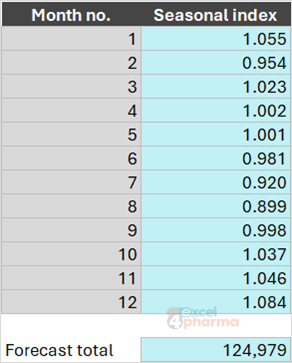
The Historical sheet follows three steps for 24 months of Velorin units. First it fits a trend through the history with FORECAST. Then it divides each month by its trend value, and averages those ratios by calendar month to get a seasonal index: July is 0.920 and August 0.899, while December is 1.084. Finally it multiplies the extended trend by the index. The forecast for the next 12 months is 124,979 packs. Enter Oncavir in B1 and the trend steepens while the index flattens toward 1, because the illustrative Oncavir series has no seasonal pattern.
The method fails where there is no history to learn from, such as a launch or a new market, and where the market is unstable. It is also sensitive to shocks. A series that includes a one-off event, a stockout or a competitor's entry carries that event into the forecast unless it is corrected.
The hybrid model
A hybrid combines the first two: a statistical base, parameters for what the base cannot know, and scenarios on top. Business plans, budgets and three- to five-year strategic plans are built this way. It is complete, because it handles both continuity and change, and adaptive, because new data or a new scenario updates it. It is also complex to build and to maintain, and it depends on the quality of the assumptions about the outside world.
The Hybrid sheet takes the 12 forecast months of the previous sheet and applies two assumptions: the market grows 3%, and a competitor enters in Jul-27 and takes 8% of the units from then on. At a net price of 40.80 the result is 123,669 packs and US$5,045.7 thousand, 1.0% below the pure statistical forecast. Every assumption sits in a yellow cell and can be changed, challenged or removed. Note the order: the forecast from historical data comes first and supplies the premises that the parametric layer then adjusts.
Choosing a type
Start from the question. If the need is to store and organize data, build a database. If it is to understand how a decision changes an outcome, build a simulation, parametric when the product is known. If the need is to extend a stable series, use the historical model. If the future will differ from the past in ways you can name, use a hybrid. If the audience is someone who must decide, build a report on top.
The types connect in one direction. The database feeds the others, the historical analysis supplies the parameters, the parametric or hybrid model produces the scenarios and the report presents them. Keeping them on separate sheets, even in the same file, makes each easier to audit and to replace.
Common mistakes
- Mixing raw data, calculations and report on one sheet, so that nobody can tell inputs from results.
- Building a historical forecast for a product with no history or for a market that has changed structurally.
- Using a parametric model as if its assumptions were measurements, without saying where they come from.
- Choosing a hybrid when a parametric model would do. Complexity has a maintenance cost.
- Typing parameters inside formulas instead of in labeled cells.
- Forgetting that a report shows the past and decides nothing by itself.
- Sharing a model with others without protecting the formulas.
Companion file
Illustrative data only. Not a decision tool.For further reading
- Introduction to What-If Analysis - Microsoft Support
- Overview of Excel tables - Microsoft Support